
ClinicShifts vs QGenda: Pricing, Features and Which Fits Your Practice
QGenda doesn't publish its pricing; ClinicShifts is $10 per provider per month. An honest side-by-side on cost, setup, location visibility, mobile and what each one does that the other doesn't.
If you're reading this, you've probably sat through a QGenda demo, or you're about to. QGenda is the best-known physician scheduling platform in the United States, and it's built for hospitals and health systems. ClinicShifts is built for something narrower: practices whose providers work across several locations, such as offices, outside hospitals and nursing facilities.
This is our product's page, so we have a stake in it. We've tried to be straight about where QGenda is the better choice, and every fact about QGenda comes from a public source listed at the end.
ClinicShifts vs QGenda at a glance
| ClinicShifts | QGenda | |
|---|---|---|
| Built for | Practices of roughly 5–60 providers working across several locations | Hospitals, health systems and large multi-department groups |
| Owner | Independent | Hearst Health (since 2024) |
| Price | $10 per provider per month, published | Not published; quoted through sales |
| Setup fee | None | Implementation usually quoted separately |
| Free trial | 90 days, no card | Demo through sales |
| Time to go live | Days; we import your spreadsheet | Implementation project |
| Schedule views | By location and by provider | By department and organization |
| Outside locations | Each location gets its own live link without a login, plus change emails | Built for staff inside the organization |
| Conflict checks | Double bookings across locations, time off, part-time patterns, as you assign | Rules engine |
| Automatic schedule generation | No | Yes |
| Swap and time-off requests | No; an administrator makes changes | Yes |
| Mobile | iOS and Android for admins and providers | Provider mobile app |
| Credentialing, time tracking, residency | No | Yes, as part of the platform |
Pricing: QGenda vs ClinicShifts
QGenda doesn't publish its pricing. You describe your organization, QGenda scopes it, and you get a quote, usually with a one-time implementation fee on top of the subscription. Third-party sites estimate $500 to $1,000 per provider per month. QGenda hasn't confirmed that, and the same sites publish totals that contradict their own range, so treat it as a sign that QGenda is priced for health systems rather than as a number for your budget.
ClinicShifts publishes its price: $10 per provider per month. Admins who never take a shift are free, locations are unlimited, there's no setup fee, and importing your current schedule is included.
| Providers | ClinicShifts per month | ClinicShifts per year | QGenda |
|---|---|---|---|
| 5 | $50 | $600 | Quote only |
| 15 | $150 | $1,800 | Quote only |
| 30 | $300 | $3,600 | Quote only |
| 60 | $600 | $7,200 | Quote only |
If you're still evaluating QGenda, ask for these as separate lines in the quote: the subscription, each module, implementation, data migration, training, text-message notifications, the contract term, the annual increase, and what happens to your data if you leave. Then compare the first-year total with the column on the left.
Setup: a project vs a few days
QGenda is implemented with the vendor: your departments, rules, providers and integrations are configured, then your administrators are trained. That's the right approach when scheduling spans hundreds of providers, and it takes weeks of someone's time on your side too.
ClinicShifts setup is done for you. Send us your current schedule in whatever form it's in (Excel, Google Sheets, a PDF, screenshots) and we import your providers, locations and shifts. Then a training session with your admin over a video call, and you review everything before going live. Most groups are running within days.
Who sees the schedule
In a hospital, everyone who looks at the schedule works for the hospital. In a multi-location practice, the people who most need it often don't work for you: the front desk at each office, the director of nursing at each facility, the answering service after hours.
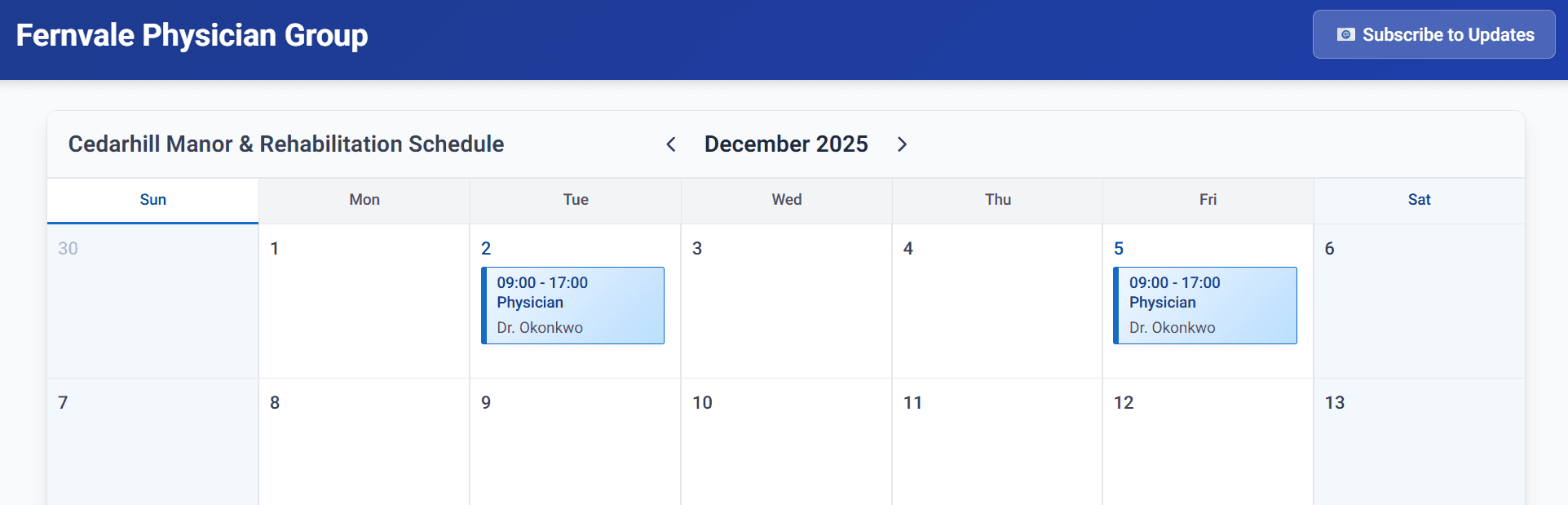
ClinicShifts gives every location its own live schedule link that opens without a login, showing only that location's providers. Staff bookmark it, and can subscribe to be emailed when it changes. That replaces most of the "who's coming today?" calls a multi-location office gets.
Changes, notifications and mobile
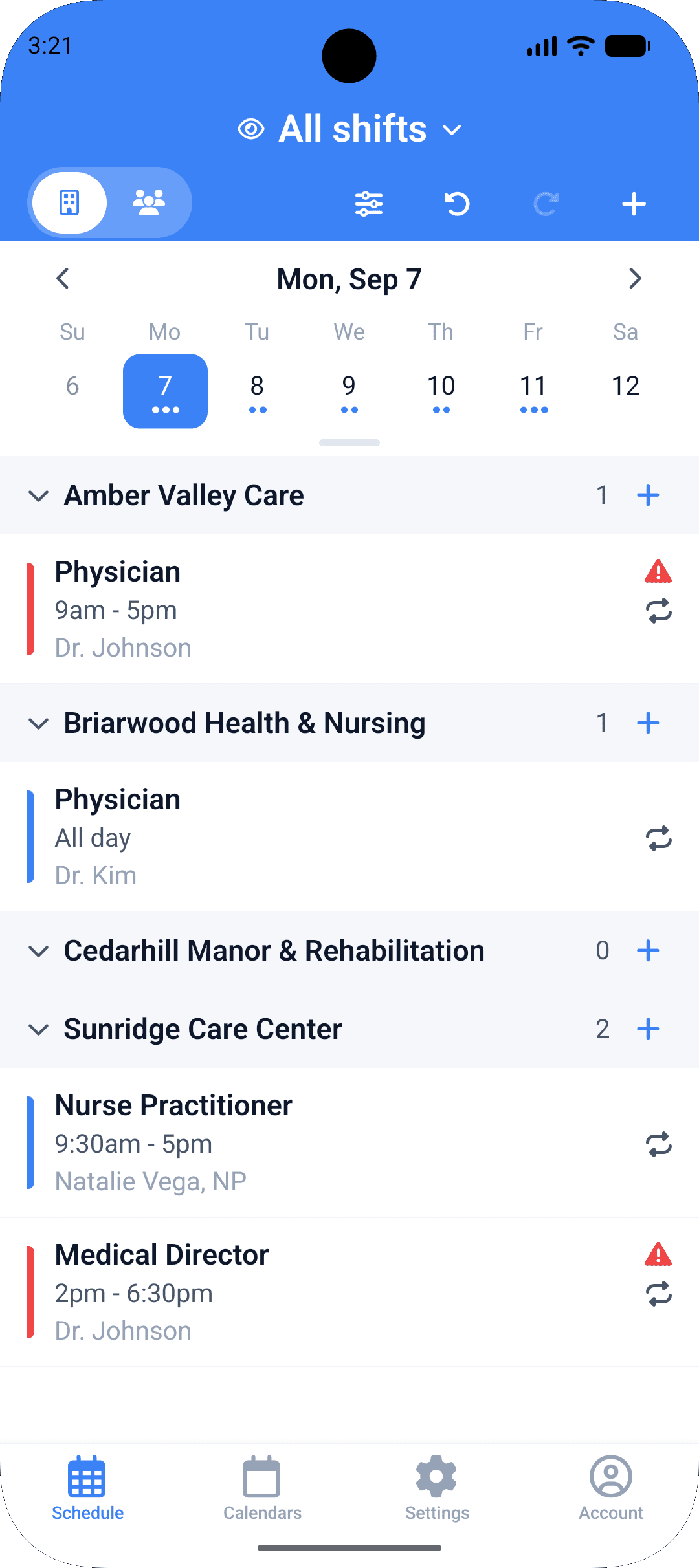
When you change a published shift in ClinicShifts, the providers involved and every subscribed location contact are emailed automatically, batched so an afternoon of edits is one message. Drafts send nothing, so you can build next month in private.
The iOS and Android apps are built for the administrator as well as providers: a call-out at 6 a.m. is handled from the phone by reassigning and publishing. Providers see where they are tomorrow in the app or in Outlook, Google or Apple Calendar.
Conflicts across locations
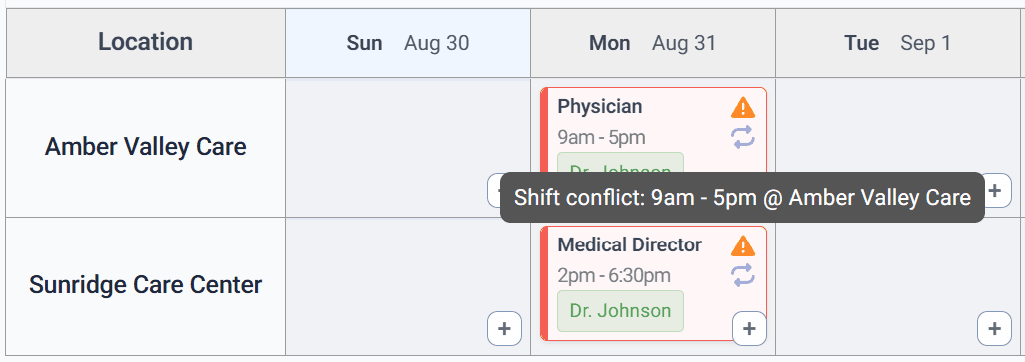
The mistakes that hurt a multi-location group are cross-location: the same provider in two buildings on the same morning, a provider on the day they asked off, a part-time NP on a day she doesn't work. ClinicShifts flags each on the shift card as you assign, including in-house call that runs into the next morning's clinic.
What QGenda does that ClinicShifts doesn't
Be clear about this before you choose:
- Automatic schedule generation. QGenda builds schedules from rules. ClinicShifts doesn't generate the schedule; you build it, with repeating shifts and conflict checks doing the heavy lifting.
- Swap and time-off requests. QGenda lets providers request changes. In ClinicShifts an administrator records time off and makes swaps.
- A wider platform. QGenda covers credentialing, nurse and staff scheduling, time tracking and residency management, through acquisitions including Shift Admin (2021), Schedule360 (2021) and New Innovations (2025).
- Enterprise scale and integrations. QGenda is built for health systems with many departments and existing enterprise systems.
If those are what you need, QGenda is likely worth its price, and ClinicShifts isn't trying to be that.
Which should you choose?
Choose QGenda if:
- You schedule for a hospital, health system or large multi-department group.
- You need the schedule generated from complex rules, or provider self-service requests.
- You want credentialing, time tracking or residency management from the same vendor.
- You have an implementation team and budget.
Choose ClinicShifts if:
- You're an independent group of roughly 5 to 60 providers.
- Your providers work across several offices, hospitals or nursing facilities.
- The people who most need the schedule work at those locations, not for you.
- You want a published price and to be live this month.
Still comparing other tools? Our guide to QGenda alternatives covers Amion, Lightning Bolt and others. Also comparing Amion? Read ClinicShifts vs Amion.
Switching from QGenda
- Check your QGenda term and notice period.
- Send us your schedule: an export, a spreadsheet or screenshots. We import it.
- Train your admin on a 30-minute video call.
- Run both during the 90-day free trial, if you like, until your QGenda term ends.
- Send each location its live link, and you're done.
Frequently asked questions
- How much does QGenda cost?
- QGenda doesn't publish pricing. It quotes per organization through its sales team, usually with a one-time implementation alongside the subscription. Third-party sites estimate $500 to $1,000 per provider per month, but QGenda hasn't confirmed that range. ClinicShifts publishes its price: $10 per provider per month.
- Is ClinicShifts cheaper than QGenda?
- Almost certainly, though only a QGenda quote can say by how much. ClinicShifts is $10 per provider per month with no setup fee; a 15-provider group pays $150 a month. QGenda is priced and implemented for hospitals and health systems.
- What does QGenda do that ClinicShifts doesn't?
- Automatic schedule generation from rules, provider swap and time-off request workflows, credentialing, nurse and staff scheduling, time tracking, residency management, and enterprise integrations. If you need those, QGenda is the better fit.
- What does ClinicShifts do better than QGenda for a small group?
- It's built around locations rather than departments: each office or facility gets its own live schedule link without a login and can subscribe to change emails, conflicts are checked across locations as you assign, the administrator can run the schedule from a phone, and you can be live in days with a published price.
- How long does it take to switch from QGenda to ClinicShifts?
- Usually days. Send us an export or screenshots of your current schedule; we import providers, locations and shifts, train your admin on a video call, and you review everything before going live. The 90-day free trial lets you run both until your QGenda term ends.
- Does QGenda own ShiftAdmin and Tangier?
- Yes. QGenda acquired Tangier in December 2017 and Shift Admin in January 2021, so they're not independent alternatives to QGenda. QGenda itself has been owned by Hearst since 2024.
How we researched this
ClinicShifts is our product, so we have a stake in this comparison. We've tried to be fair: facts about other products come from the vendors' own websites, press releases and public help pages, checked in November 2026. Where a vendor doesn't publish something, we say so rather than guess. If anything here is wrong or out of date, email support@clinicshifts.com and we'll correct it.
Sources
- Business Wire: Hearst agrees to acquire QGenda (Aug 12, 2024)
- Business Wire: QGenda acquires Shift Admin (Jan 14, 2021)
- Business Wire: QGenda acquires Schedule360 (Nov 16, 2021)
- Healthcare IT Today: QGenda announces acquisition of New Innovations (July 2025)
- MedAligna: QGenda pricing (third-party estimate, unconfirmed by QGenda)
QGenda, Amion, Lightning Bolt, ShiftAdmin, Tangier and the other product names on this page are trademarks of their respective owners. ClinicShifts is not affiliated with or endorsed by them.