
How to Reduce the Administrative Burden of Physician Shift Scheduling
Where physician scheduling time actually goes each month, and 9 concrete ways to cut it, from written rules and templates to automatic notifications.
Ask the person who builds a physician schedule where their month goes, and the answer is rarely "building the schedule". It's the work around it: chasing time-off requests, checking by eye that nobody is double-booked, re-sending the file after every change, and answering calls from offices and facilities that want to know who's coming. One common complaint puts it simply: our manual scheduling takes eight hours a month, and other groups say theirs is automated.
This guide breaks down where that time goes and gives nine concrete ways to reduce the administrative burden of physician shift scheduling, each with something you can do this week. It applies to any group; there's a section on hospitalist groups specifically near the end.
Where the hours actually go
Here's an illustrative time audit for a group of 15 providers covering 10 locations, building a monthly schedule in a spreadsheet. Your numbers will differ; the point is the shape. Track your own for one month using the same rows.
| Step | What happens | Illustrative time per month |
|---|---|---|
| Collect requests | Emails and texts about time off, preferences, conferences | 60 min |
| Build the draft | Copy last month, adjust for requests and coverage needs | 90 min |
| Check conflicts | Scan for double bookings, time off, part-time days | 45 min |
| Fix and re-check | Resolve what the check found, then check again | 30 min |
| Publish | Export, format, send to providers | 20 min |
| Tell the locations | Send each office or facility its part | 40 min |
| Handle changes | Call-outs and trades: edit, re-send, tell each person affected | 120 min |
| Answer "who's on?" | Calls and messages from locations and the answering service | 75 min |
| Total | About 8 hours |
Two things stand out. First, the initial build (draft plus conflict checks) is under a third of the total. Second, the biggest rows, changes and "who's on?" calls, repeat all month, which is why the schedule never feels finished. The fixes below target the big rows first.
9 ways to reduce the scheduling burden
1. Collect time off and preferences in one place, with a deadline
Requests that arrive by text, email and hallway conversation are the first time sink: you collect them, transcribe them, and still miss one. Pick one channel (a shared form, an inbox, or whatever your team will actually use) and one deadline, such as the 10th of the month for next month. Requests after the deadline are handled as changes.
In ClinicShifts the administrator records time off on the provider's calendar, and it's checked against every assignment from then on. There's no provider request workflow in the app, which keeps one person in control; the collection channel is yours to choose.
This week: announce the channel and the deadline for next month's requests.
2. Turn unwritten rules into written rules
Every group has rules that live in the scheduler's head: minimum coverage per location, who doesn't work Fridays, maximum consecutive days, the NP who only works alternate weeks, who can't be at two particular facilities on the same day. Unwritten rules make the scheduler irreplaceable and every build slower, because each one is re-derived from memory.
Write them on one page. Where a tool can hold them, put them in the tool: in ClinicShifts, each provider's availability (full time, or part time on chosen weekdays, alternating weeks or every N weeks) is set once, and shifts outside it are flagged.
This week: write down the five rules you check most often.
3. Build from repeating patterns, not from scratch
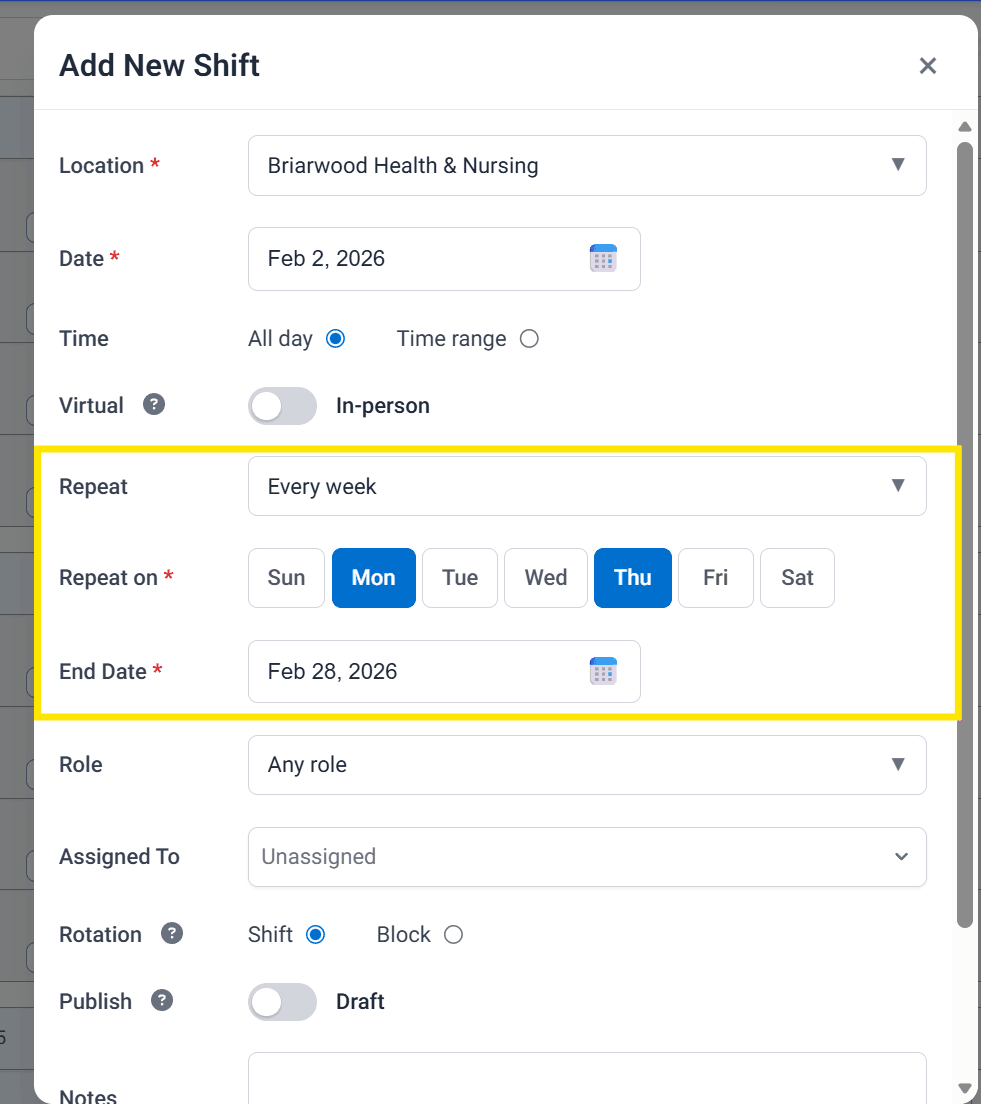
Most of a month looks like last month. If you rebuild it cell by cell, you redo work that doesn't change. Set recurring assignments once: the provider who covers the same facility every Tuesday and Thursday, the clinic that runs every other Monday.
ClinicShifts repeats a shift every week, every two weeks or every three weeks on the days you choose, so a standing rotation is entered once.
This week: list the assignments that haven't changed in three months. Those are your template.
4. Catch conflicts before you publish, not after
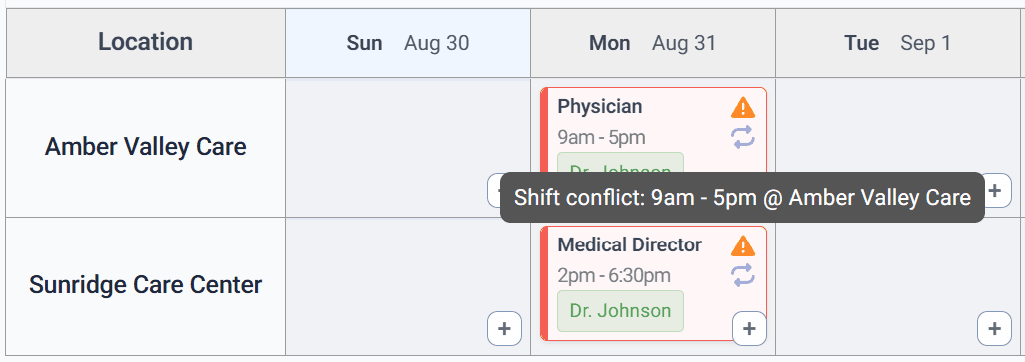
Checking for conflicts by eye is slow and unreliable, and a conflict found after publishing costs a re-send and a round of messages. The fix is a check at the moment of assignment: the same provider in two places at once, a provider on approved time off, a part-time provider on a day they don't work.
ClinicShifts flags each of these on the shift card as you assign, across every location, and in-person shifts are checked across locations in different time zones.
This week: if you're on a spreadsheet, add a column that counts each provider's assignments per day, and highlight anything over one.
5. Draft, review, then publish once
If everyone sees the schedule while you build it, every half-finished change generates a question. Build in a draft no one else sees, review it, and publish once. In ClinicShifts, providers only see shifts after you publish, and draft changes send no notifications, so an afternoon of rearranging doesn't become a dozen emails.
This week: stop sharing the working file. Share only the finished version.
6. Automate change notifications to providers and locations
The "handle changes" row is usually the biggest because each change is three jobs: edit the schedule, re-send it, and personally tell everyone affected. Automating the last two removes most of the row.
In ClinicShifts, when a published shift is added, changed or removed, the provider is emailed, and so is every location contact who subscribed to that location's schedule. Changes made in one session are batched into a single email per person.
This week: count how many messages you sent about schedule changes last month. That's the size of this fix.
7. Give each location a live schedule link
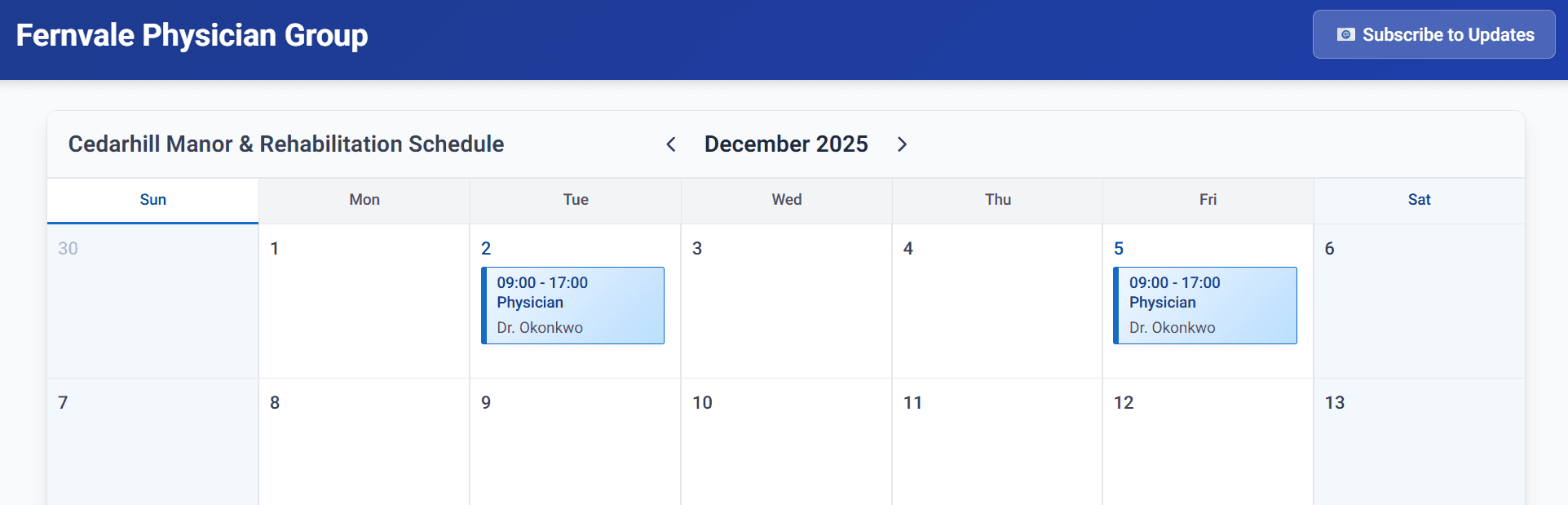
"Who's coming today?" calls come from people who can't see the current schedule. Give them a view of it that's always current. In ClinicShifts, each location gets a live schedule link that opens without a login. Front desks, directors of nursing and answering services bookmark it, and can subscribe to be emailed when it changes.
This week: note every call or message you get asking who's working. That's what a live link replaces.
8. Sync the schedule to providers' calendars
Providers who check their own calendar don't ask the scheduler. ClinicShifts lets providers subscribe to their shifts from Outlook, Google Calendar or Apple Calendar, and the iOS and Android apps show where they are tomorrow.
This week: ask your providers which calendar they actually use.
9. Write a call-out protocol before you need it
A call-out at 6 a.m. is the most expensive moment in the scheduling month, because the steps are improvised every time. Decide in advance: who the provider calls, who decides on coverage, the order in which backups are asked, and who tells the location and the answering service. Our call-out coverage playbook has a step-by-step protocol you can adapt.
In ClinicShifts the administrator can reassign the shift and publish from the phone app, and the notifications in step 6 tell everyone affected.
This week: write the protocol on half a page and send it to the group.
Manual, spreadsheet or scheduling software: what each saves
| Task | Manual or paper | Spreadsheet | Provider scheduling software |
|---|---|---|---|
| Collect requests | By hand | By hand | Recorded once, checked automatically |
| Build the draft | From scratch | Copy and edit last month | Repeating shifts and patterns |
| Check conflicts | By eye | Formulas, if someone builds them | Flagged as you assign |
| Publish | Print and hand out | Email a file | Publish once; everyone sees it |
| Tell locations | Phone calls | Email each location | Live link per location, subscriptions |
| Handle changes | Re-do and re-tell | Edit, re-send, re-tell | Edit and publish; notifications go out |
| Answer "who's on?" | Phone | Phone | The location checks its own link |
A spreadsheet is free and fine for a small group with one location; we've written an honest comparison of ClinicShifts vs spreadsheets that says when to stay. The time it costs shows up in the bottom three rows.
For hospitalist groups specifically
Hospitalist schedules add a few burdens of their own:
- Block schedules. Seven-on, seven-off and similar patterns repeat for months. Set the block once as a repeating shift instead of rebuilding it.
- Nights and swing shifts. A 7 p.m. to 7 a.m. night belongs to two dates. Keep nights on the same board as days so a night followed by a morning shift is visible. ClinicShifts supports overnight and 24-hour shifts, marks them as ending the next day, and checks conflicts into the next morning.
- Several hospitals. Groups covering more than one hospital need a view per hospital, and each hospital needs to know who's on. That's the per-location view and live link above.
- Weekend and holiday fairness. The arguments are rarely about the formula and mostly about whether people can see it. Write the rotation rules down and publish the history. See why physicians say the schedule isn't fair.
- Census-driven coverage. Coverage minimums change with census. Decide in advance who is first to add and who is first to release, so a change is a decision rather than a negotiation.
A scheduling time audit you can run this month
You don't need a worksheet template to start. Copy the eight rows from the time audit table into a note, and each time you work on the schedule this month, add the minutes to the row. At the end of the month you'll know which fix above is worth the most to your group. It's usually the changes row.
Most groups that run this find the build itself isn't the problem. Distribution is. That's what ClinicShifts is built around: one live schedule by location and by provider, conflicts caught as you assign, and changes that announce themselves. See how it works for post-acute & SNF groups, wound care, podiatry and PM&R practices, or compare features.
Frequently asked questions
- How long should physician scheduling take each month?
- There's no standard, because it depends on group size, the number of locations and how often the schedule changes. A useful test: if building next month takes longer than a few hours, or if changes after publishing take more time than the original build, the process is doing work a tool or a written rule could do.
- What is the biggest source of scheduling admin work?
- Usually changes and communication rather than the initial build: re-sending the schedule after each call-out, telling each affected provider and location by hand, and answering calls from locations asking who is coming. Those repeat all month.
- Can physician scheduling be fully automated?
- Parts of it can. Some tools generate a schedule from rules, which helps large departments with complex fairness rules. But someone still decides the rules, handles exceptions and call-outs, and owns the result. For small and multi-location groups, automating notifications and distribution often saves more time than automating the build.
- How do we reduce scheduling errors?
- Check conflicts at the moment of assignment rather than after publishing: the same provider in two places, a provider on approved time off, a part-time provider scheduled on a day they don't work. Then keep one live schedule so nobody works from an old copy.
- How do hospitalist groups reduce scheduling workload?
- Set the block pattern once and repeat it, keep nights and swing shifts on the same board as days so conflicts across the next morning are visible, agree holiday and weekend rotation rules in writing, and give each hospital a live view of who is on. Most of the remaining work is handling changes, so make those announce themselves.
- Does scheduling software replace a scheduler?
- No. Someone still owns the schedule and its decisions. Good software removes the clerical work around it: re-checking conflicts, re-sending files, and answering calls about who is working, so the scheduler's time goes to decisions instead.
Try it on your own schedule
Send us your current spreadsheet and we'll import it into a free trial and walk your admin through it. The first 90 days are free, no card, then $10 per provider per month.