
Wound Care Provider Scheduling: 7 Problems Multi-Facility Groups Face, and How to Fix Them
Why wound care provider schedules break across SNFs and clinics (weekly rounds, routes, call-outs, facility visibility) and how to fix each one.
Wound care runs on cadence. Each facility expects its wound rounds on the same days every week, each provider covers a circuit of buildings, and the facility staff have to prepare for every visit: the resident list, supplies, a nurse free to round with the provider. When the schedule slips, residents go unseen and a facility wonders why nobody came.
Most of the writing about wound care scheduling problems is about patient appointments in a clinic. This guide is about the other schedule: which provider covers which facilities on which days, in a group of several providers rounding across many nursing facilities, clinics and assisted living communities. Here are the seven problems those groups hit most, and how to fix each one.
How wound care coverage works
A typical multi-facility wound care group looks like this:
- Few providers, many facilities. Six wound care physicians and NPs might cover thirty facilities.
- Weekly rounds. Each facility has its day or days, such as Mondays and Thursdays, or every other Wednesday, and expects them every week.
- Mobile providers. Providers drive a circuit of buildings each day, and drive time is a real part of the workload.
- Outside audiences. The people who most need the schedule are each facility's director of nursing, wound nurse and front desk, none of whom work for you.
That shape is the source of every problem below.
7 wound care scheduling problems, and how to fix them
1. Keeping each facility's round days consistent
Every facility has its rhythm, and rebuilding that rhythm by hand each month is exactly where gaps creep in. A missed week is noticed by the facility long before it's noticed in your office.
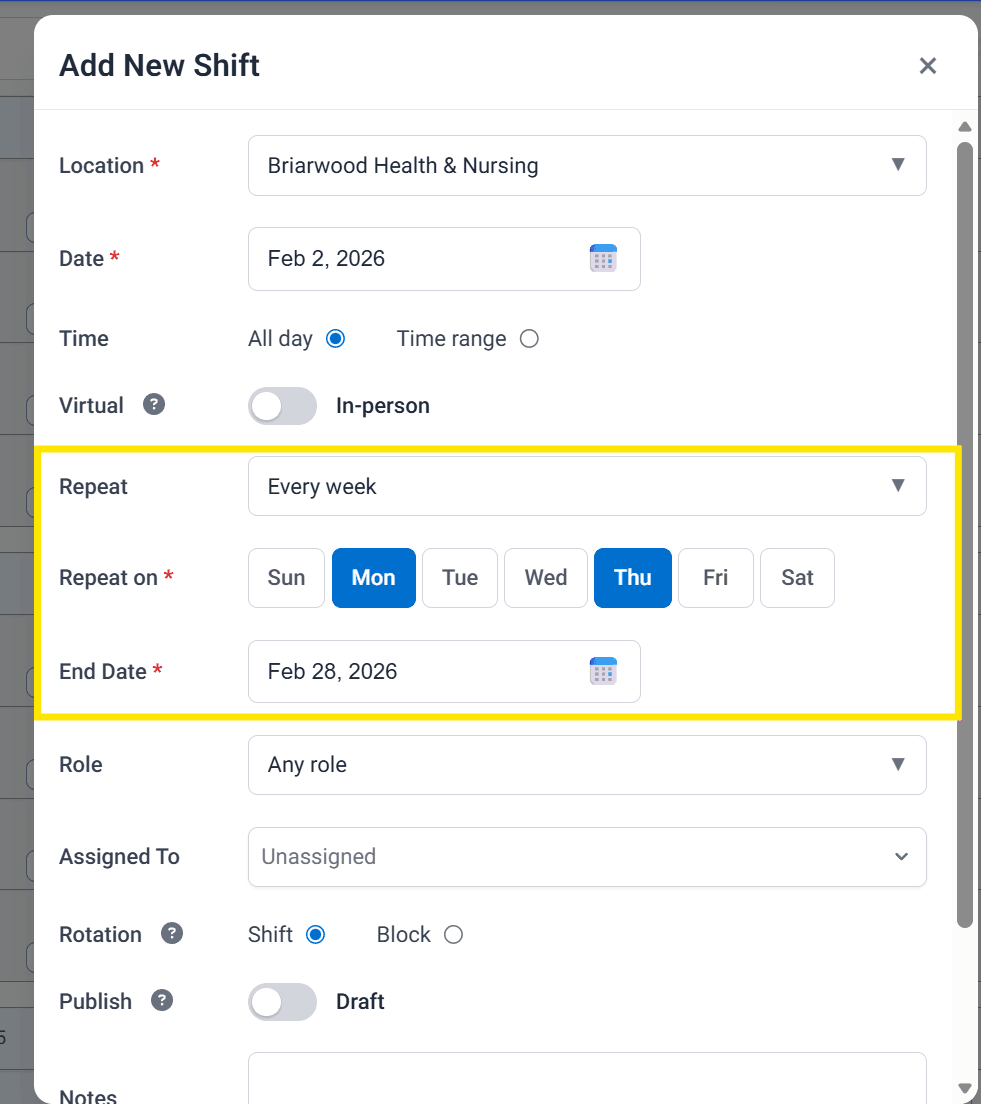
Fix: set each facility's days once as a repeating pattern, not a monthly retype. In ClinicShifts, a shift repeats every week, every two weeks or every three weeks on the days you choose, with an end date, and you can still change a single day without touching the series.
2. Drive time between facilities
A provider with three buildings an hour apart works a longer day than one with three buildings on the same street, on paper the same shift. Ignore drive time and you burn out the providers with the bad circuits.
Fix: plan by geography first. Cluster facilities, give each cluster fixed days, and assign circuits so nobody crosses the region twice in a day. See the route and day planning section below.
3. Covering call-outs without breaking rounds
When a wound care provider calls out, a full day of visits across several buildings is at risk. The usual response, a scramble of texts, often leaves at least one facility uninformed.
Fix: decide coverage before it's needed. Each cluster has a named backup; the facilities with the most urgent residents are covered first; the rest are moved to another day that week; and every affected facility is told before the day starts. In ClinicShifts, the administrator reassigns from the iOS or Android app and publishes, and the covering provider and every subscribed facility contact are emailed automatically. Our call-out coverage playbook has a full protocol.
4. Facilities not knowing who's coming
If a facility doesn't know which provider is coming and when, the resident list isn't ready, the wound nurse is busy, and the visit runs badly or not at all. Emailed PDFs go stale the moment something changes.
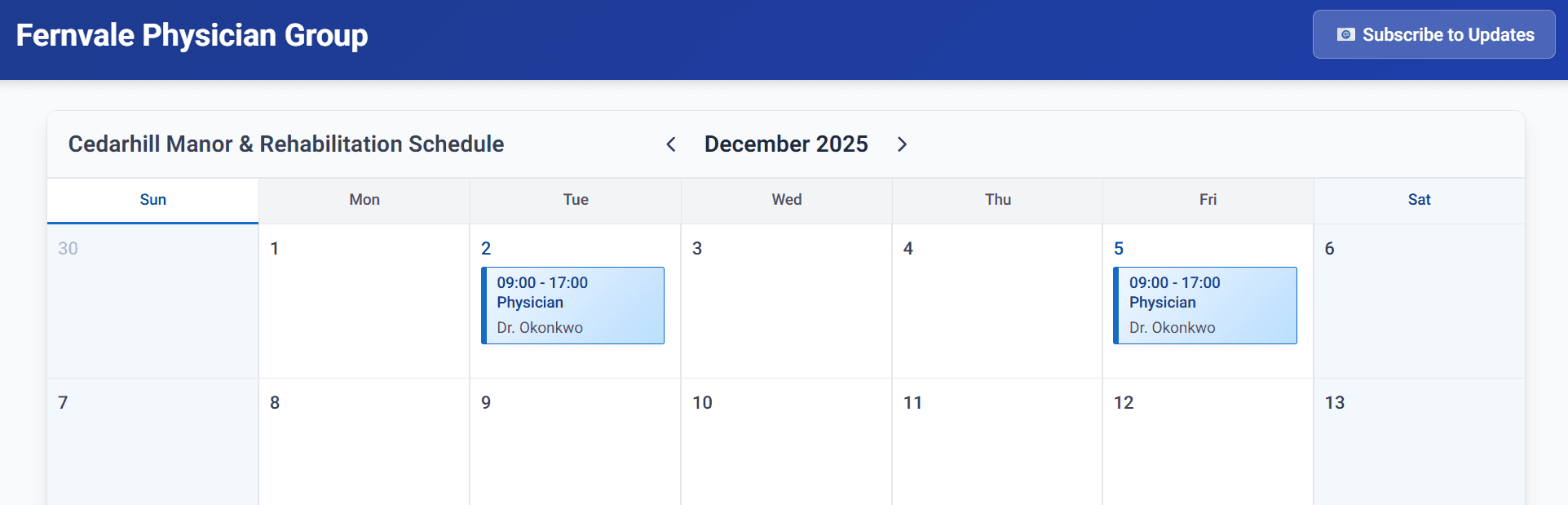
Fix: give each facility a live view of its own schedule. In ClinicShifts every facility gets a link that opens without a login and always shows the current schedule, and its staff can subscribe to be emailed when it changes.
5. Credentialing and privileges per facility
Not every provider is set up at every facility. Sending a provider to a building where they aren't credentialed or oriented wastes a day.
Fix: keep a simple list of which providers are approved at which facilities, and assign from it. In ClinicShifts, each provider is linked to the locations they work at, and the picker lists those providers first when you assign a shift at that location. ClinicShifts doesn't track credentials or expiry dates, so keep those in your credentialing system.
6. Onboarding a new facility
A new contract means a new set of days, a new contact list and a new building in someone's circuit, often at short notice.
Fix: decide which cluster the facility joins before you start, add its days as a repeating pattern, and send the facility its live schedule link on day one. Locations are unlimited in ClinicShifts, so adding a facility doesn't change the price.
7. Part-time and PRN providers
Part-time providers who work fixed days, alternate weeks or a few days a month are easy to schedule on the wrong day.
Fix: record each provider's availability once. In ClinicShifts you set full time or part time, on chosen weekdays, alternating weeks or every N weeks, and any shift outside it is flagged when you assign.
Route and day planning
A simple method that works without route-optimization software:
- Map your facilities and draw clusters of buildings within a reasonable drive of each other.
- Give each cluster fixed days, matched to how often its facilities need rounds.
- Assign circuits: each provider covers a few clusters on set days.
- Order the day within the cluster with a maps app; that's routing, and it doesn't need to live in the schedule.
- Name a backup per cluster for call-outs.
For example, a group with six providers and thirty facilities might plan like this:
| Cluster | Facilities | Round days | Primary | Backup |
|---|---|---|---|---|
| North | 6 | Mon, Thu | Provider A | Provider D |
| East | 5 | Tue, Fri | Provider B | Provider E |
| South | 7 | Mon, Wed | Provider C | Provider F |
| West | 6 | Tue, Thu | Provider D | Provider A |
| Central | 6 | Wed, Fri | Provider E | Provider B |
| PRN cover | — | As needed | Provider F | — |
ClinicShifts schedules who goes where and when; it doesn't do turn-by-turn routing or calculate drive times. Viewing the board by provider makes each circuit easy to check.
Worked example: six providers, thirty facilities
With the plan above, each facility's rounds are set up once as repeating shifts for the year. Each month the administrator only handles exceptions: time off, holidays, a new facility, a call-out.
When Provider C calls out on a Monday, the administrator opens the phone app, reassigns the South cluster's urgent facilities to Provider F, moves the rest to Wednesday, and publishes. Provider F and every subscribed contact at the affected facilities are emailed; the facilities' live links show the change immediately. Nobody in the office writes a message, and no facility finds out when nobody arrives.
When to move off spreadsheets
A spreadsheet and a group text can run a wound care schedule for a while. You're past it when any two of these are true:
- Your providers cover more than ten facilities.
- Facilities call your office to ask who's coming.
- A call-out means a dozen messages.
- One person holds the circuits in their head and can't take a week off.
- A facility has gone without rounds in the last year because of a scheduling mistake.
Read our honest comparison of ClinicShifts vs spreadsheets, or how to reduce the administrative burden of physician scheduling more generally.
Provider scheduling built for wound care groups
ClinicShifts is provider scheduling for groups whose providers work across many locations: facility round days you set once and repeat, conflicts flagged as you assign, a live schedule for every facility, and a phone app for call-outs. It's $10 per provider per month; facilities are unlimited. See how it works for wound care groups and post-acute & SNF groups.
Frequently asked questions
- Why is wound care scheduling so hard?
- Because the ratio is lopsided: a few providers cover many facilities, each facility expects the same days every week, the facilities are spread out, and the people who need the schedule work for the facilities, not for you. Any one call-out ripples across several buildings.
- How do you plan wound care routes between facilities?
- Cluster facilities by geography, give each cluster fixed days, and assign each provider a circuit of clusters. Plan the days first and the order of visits within a day second. Turn-by-turn routing is a job for a maps app; the schedule's job is making sure each facility's day is covered by someone who can reach it.
- Does ClinicShifts optimize driving routes?
- No. ClinicShifts doesn't plan routes or travel times. You decide which provider covers which facilities on which days, and ClinicShifts keeps that schedule conflict-free, published and visible to every facility.
- How should a wound care group handle a provider call-out?
- Decide in advance who covers each cluster, protect the facilities with the most urgent residents first, reschedule the rest within the week, and tell every affected facility before the day starts. In ClinicShifts, reassigning and publishing from the phone emails the covering provider and every subscribed facility contact.
- Can wound care facilities see the schedule without an account?
- Yes. In ClinicShifts every facility gets a live link to its own schedule that opens without a login, and staff can subscribe to be emailed when it changes.
Try it on your own schedule
Send us your current schedule and we'll import it into a free trial. The first 90 days are free, no card.