
Understanding Shift Cards
Learn how to read shift cards on the schedule — colors, borders, icons, and warnings all convey important information at a glance.
Every shift on the schedule grid is displayed as a shift card. The card's appearance tells you key information at a glance — who's assigned, whether it's published, and if there are any issues.
Card Color
The background color of a shift card indicates its assignment status:
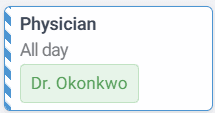
- Blue — the shift is assigned to a provider and has no warnings
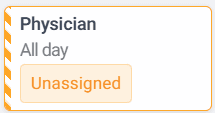
- Orange — the shift is unassigned (no provider assigned yet)
- Red — the shift has one or more warnings (e.g., scheduling conflicts)
Left Border Style
The left border tells you the shift's publication status:
Solid border — the shift is published and visible to everyone:

Striped border — the shift is a draft and visible only to admins:
Unassigned draft example:
Card Icons
Icons appear in the top-right corner of the shift card to convey additional information:
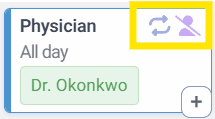
- Recurring icon (arrows) — this shift is part of a recurring series
- Virtual icon (person with slash) — this shift is virtual (e.g., on-call, telehealth)
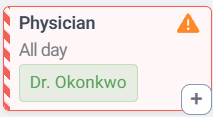
- Warning icon (triangle with exclamation mark) — this shift has one or more warnings that need attention
Card Content
Each shift card displays:
- Role — the role assigned to the shift (e.g., "Physician", "NP/PA")
- Time — "All day" or the specific time range
- Provider name — the assigned provider, or "Unassigned" if no one is assigned
Warnings and Conflicts
The system automatically detects scheduling conflicts. When an employee is assigned to overlapping in-person shifts at different locations, both shifts will turn red and display a warning icon.
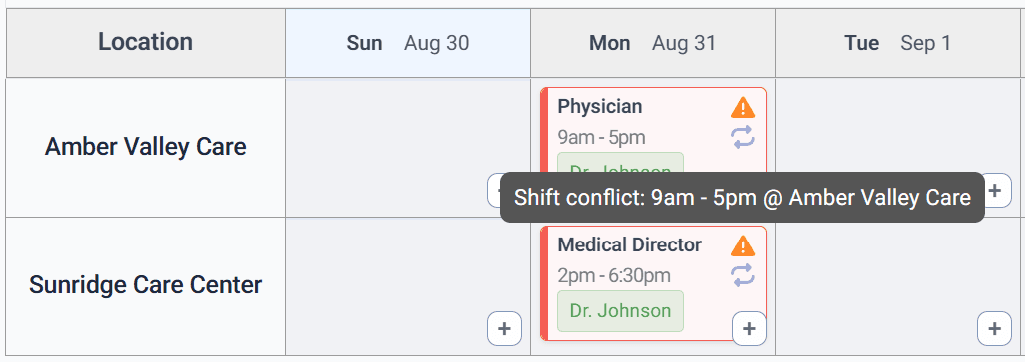
To see the details of a warning, hover over the warning icon and a tooltip will appear explaining the conflict:
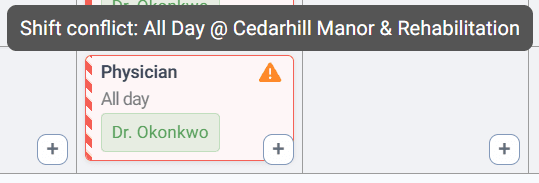
Warnings are informational only. They do not prevent you from creating or publishing shifts. The system keeps scheduling flexible — you as the admin have the final say. Warnings simply help you spot potential issues before they become problems.
Quick Reference
| Visual Cue | Meaning |
|---|---|
| Blue background | Assigned, no warnings |
| Orange background | Unassigned |
| Red background | Has warnings |
| Solid left border | Published |
| Striped left border | Draft |
| Arrows icon | Recurring shift |
| Person-slash icon | Virtual shift |
| Triangle icon | Warning — hover for details |